Scan, organise, find
MoveScan is a mobile concept for people preparing a move. You scan each room, and the app estimates your belongings and the boxes you need. While packing, you keep a list of what goes into each box. After the move, you search for an item and see which box it is in.
Estimate belongings and boxes
Create a digital inventory
Search items by box
The stress started before the first box was packed
Most people move only a few times in their lives, and every move brings many decisions, deadlines and tasks.
To understand where moving becomes stressful, I interviewed five people: recent movers, frequent movers and people who had moved without professional help.
The uncertainty appeared long before packing. Interviewees could not estimate how much they owned, how many boxes they would need or how much work the move would be. Without that, planning became a reaction to surprises.
5 of 5 interviewees mentioned uncertainty while planning.
Two different movers, one shared problem
Experienced movers worried about a growing number of belongings and a complex move. Less experienced movers did not know where to begin. Both needed to see the size of the move before packing started.
"Everything had to be carefully planned."
"You think you have six boxes, and suddenly you end up with sixteen."
The real problem was uncertainty
Interviewees did not know what needed packing, how much work was ahead, or whether everything was under control. That feeling started before the first box.
"I didn't know how many boxes I would need until I started packing."
Most of the stress came before moving day.
What if moving felt predictable?
I reviewed four moving apps: Relock, Moove, MoveAdvisor and BoxyMi. Each one supports a part of the move, such as planning, estimates or tracking boxes. None connected estimating, packing and finding items after the move.





Most competitors support one part of the move. MoveScan connects estimating, packing and finding items.
Three decisions that shaped MoveScan
Each decision started from the interviews or from what I saw in testing.
I chose estimating over planning
MoveFlow, an app focused on planning the move
ConsideredMoveScan, an app focused on estimating and organising belongings
✓ My choice- In the interviews, the stress started before packing, from not knowing the scope of the move. One interviewee said: "You think you have six boxes, and suddenly you end up with sixteen."
- Interviewees underestimated how much they owned, and estimating was the strongest pain point.
- Most competitors already offered planning and checklists. Only Moove offered estimates, and none connected them with packing and finding items.
A planner with tasks and dates. Planning stays outside the app.
P4 asked for help planning the move from the number and volume of boxes, a way the two directions could meet later.
Scanning became the main way to fill a box
Add items by hand only
ConsideredAdd items by photo only
ConsideredScan box contents first, and keep manual input
✓ My choice- In the first version, adding contents by photo sat below manual input, and testers did not always notice it.
- P3 said adding everything by hand takes too long, and P4 expected a clear choice at the start: by hand or with a photo.
- Manual input stays, so you can still add or fix items yourself.
A slightly longer form, with one more question before adding items.
The scan is simulated in the prototype, so how well it recognises items was not tested.
The box number links each box to the app
A QR icon on every box card
ConsideredThe box number as the main ID, on each card and in every search result
✓ My choice- P1 and P5 saw the QR icon but did not understand what it was for.
- P4 suggested connecting the QR code to a box number and making the number more visible.
- After the move, the question is which box to open, so each search result shows the box number.
The QR icon on the card. Its purpose was not clear, so the number does that job.
These changes came after testing and were not tested again.
Turning rooms into packing estimates
The first question was how much there is to pack. You scan a room live or upload photos, and the app estimates the belongings and the boxes you need. In the prototype, the scan is simulated.

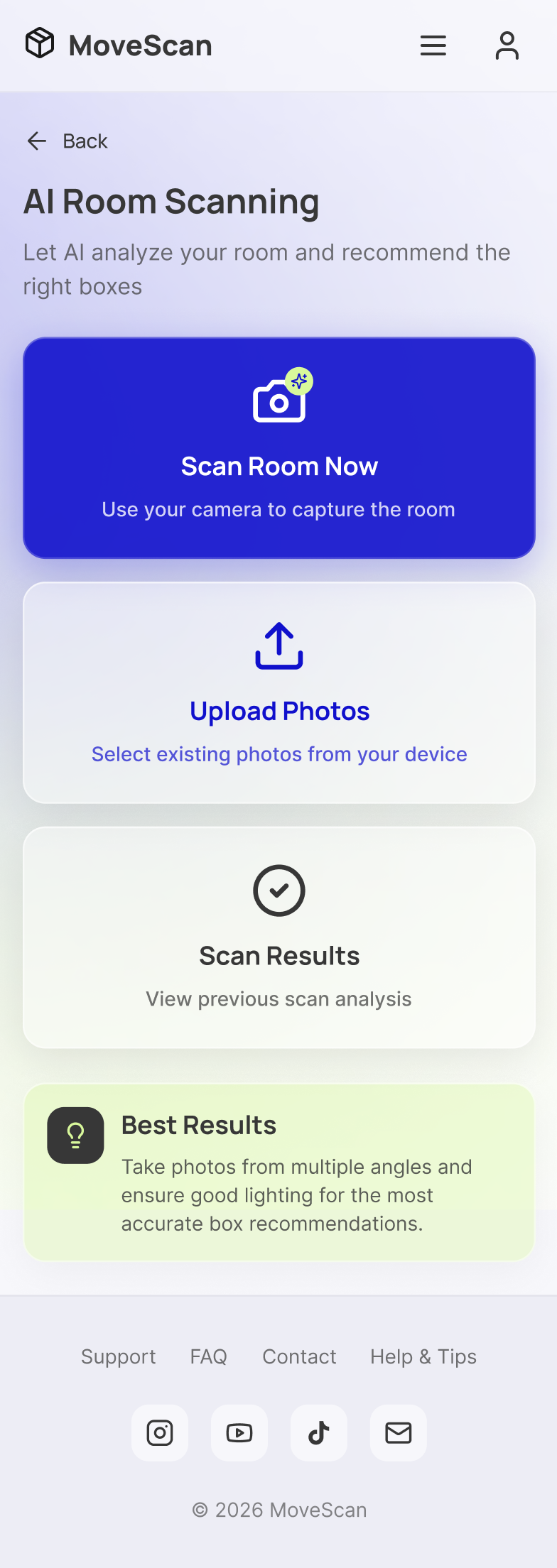
How the scanning flow turns uncertainty into clear next steps.
AI-first hierarchy
The scanning action is prioritised to make the product's main value immediately visible.
Flexible capture options
You can scan live or upload existing photos, depending on where you are.
Proactive guidance
Tips improve image quality before the scan starts, reducing ambiguity and preventing poor results.
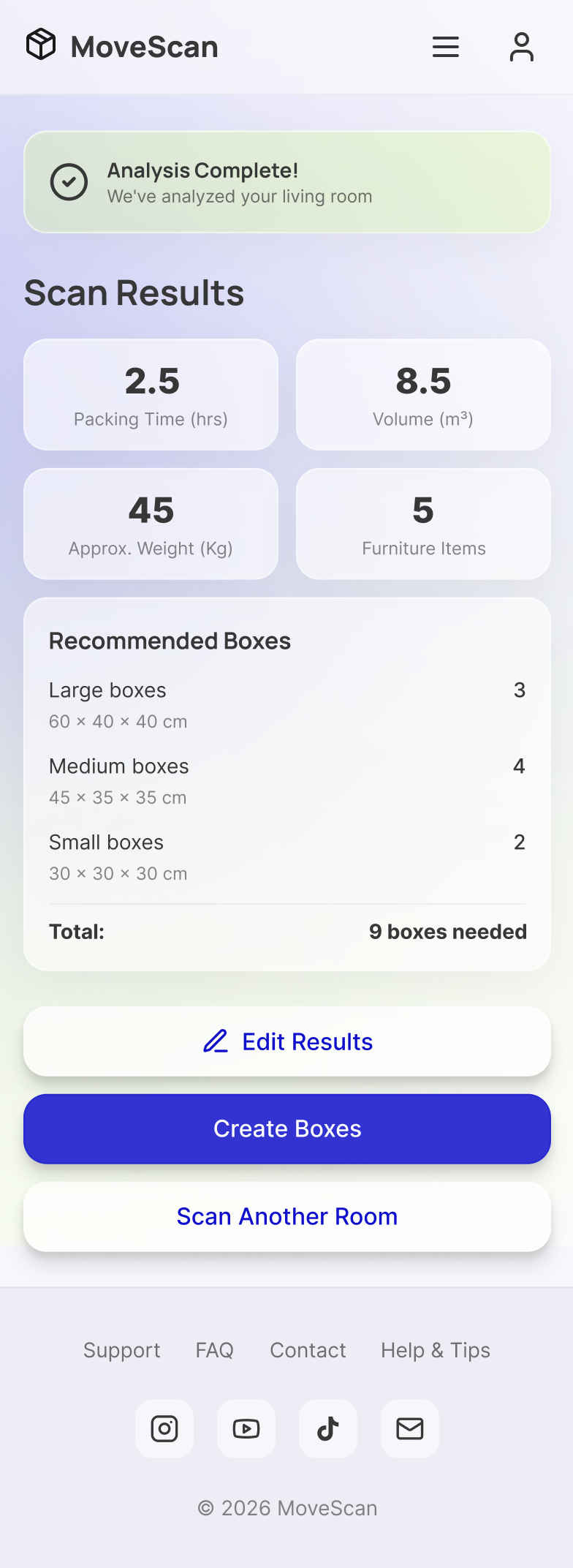
From uncertainty to visibility
The scan turns the room into concrete estimates, so you see the scale of the move.
Box recommendations
The scan turns into a packing list: which box sizes, and how many of each.
Editable AI output
You can review and adjust the results when the estimate is not right.
A list of what is in every box
Once packing starts, it is easy to forget what went into which box. You create a box, choose a room, and add its contents by photo or by hand.
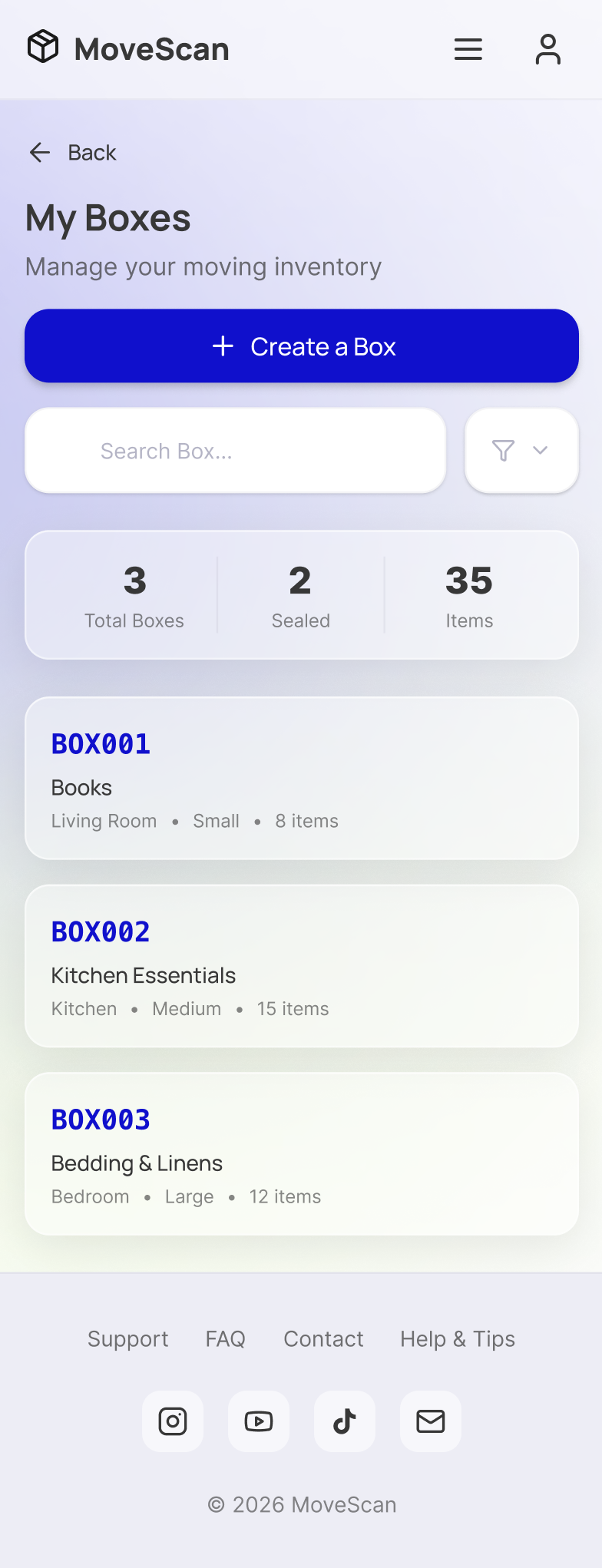
How the inventory system connects physical boxes with digital records.
Search and filters reduce effort
Narrow down boxes by name, room or category instead of scrolling through all of them.
Inventory at a glance
The summary shows packing progress: boxes, sealed boxes and items.
Box IDs connect physical and digital inventory
Large box numbers make it easier to match each physical box with its digital record.
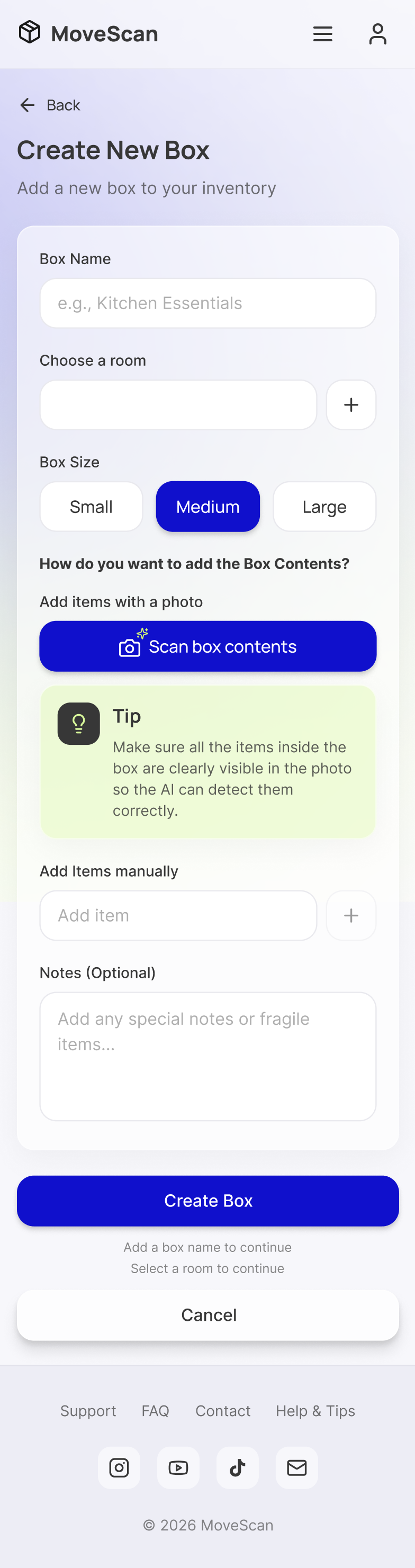
Structured box setup
Required details sit in one flow, so every box record has the same details.
AI-assisted item entry
Photo-based input reduces manual work when adding box contents.
Guidance before scanning
A short tip explains how to take a clear photo of the box contents before scanning.
Finding items without opening every box
After the move, the question is where something is. You search for an item and see the box it is in.
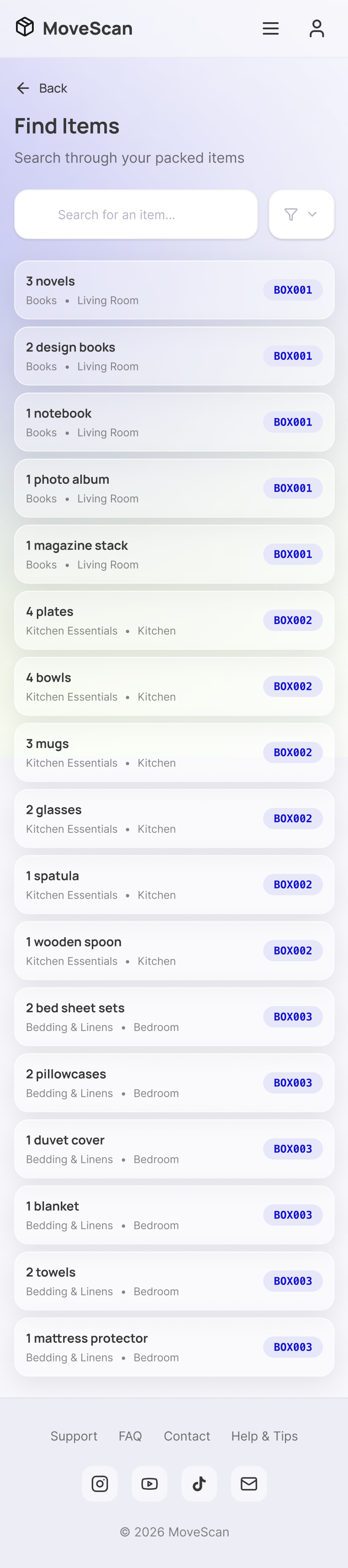
How search helps you find items without opening every box.
Searchable inventory
The inventory turns packed items into searchable records, reducing friction during unpacking.
Context-rich results
Each result shows its category and room, so you recognise where the item belongs.
Exact box location
Each result shows the box ID, so you know which box to open.
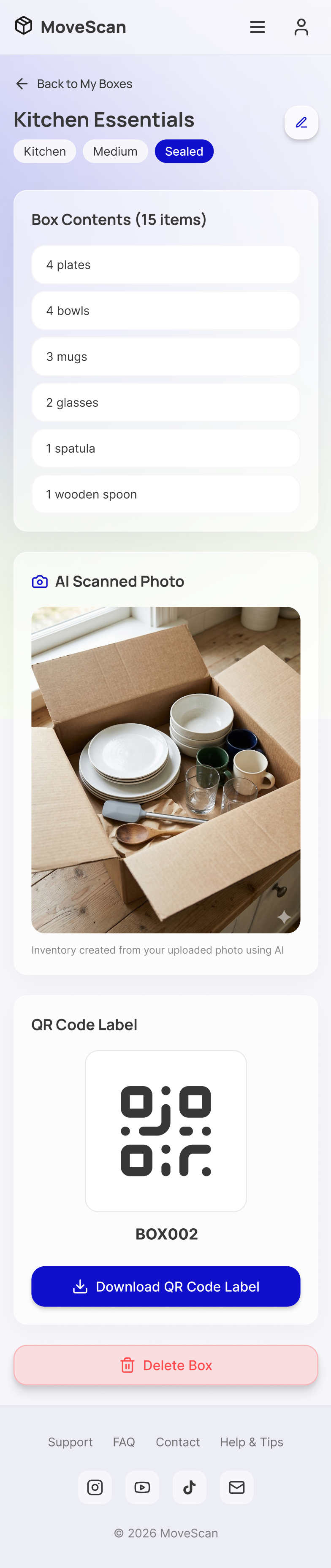
Box status at a glance
Room, size and sealed status sit at the top, so the state of each box is clear.
Structured contents list
Items are grouped inside one box record, making contents easier to review without opening the physical box.
Photo-backed inventory
The scanned photo stays with the box, so you can check what the AI listed.
Testers completed the main flows and needed clearer feedback
I ran five in-person usability sessions of 15 to 30 minutes on the mobile prototype. Each tester scanned a room, created a box, found an item and moved between sections. The AI scan was simulated, so the sessions tested whether people understood the flow, not how accurate the estimates were.
What worked
What needed work
The structure worked.
The next step was clearer feedback and less typing. That led to the three changes below.
Three changes after testing
These changes went into the final prototype. They were not tested again.
Scanning first, and saying what is missing
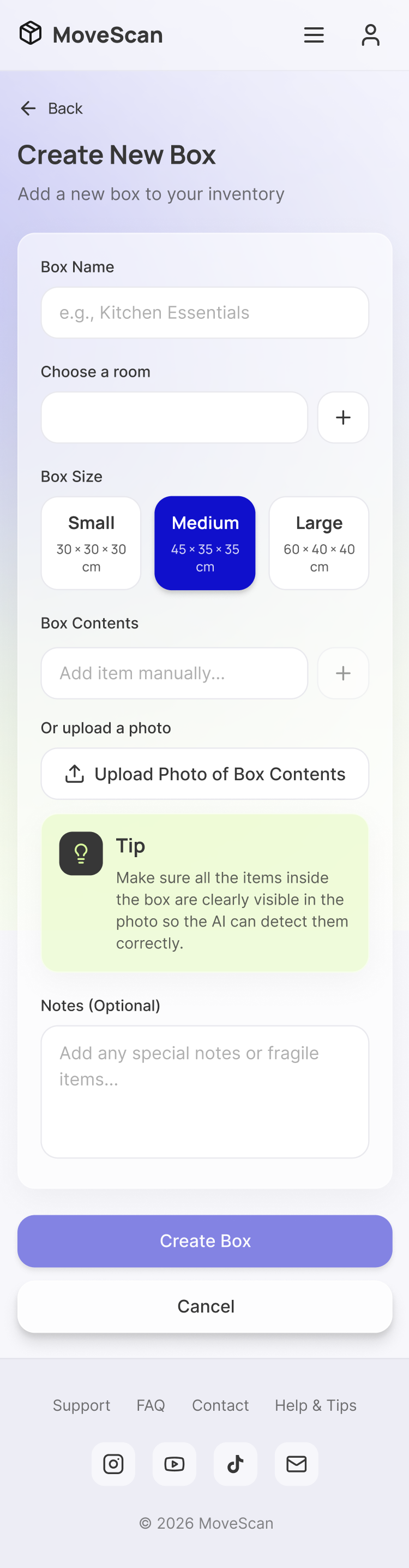
- 1Adding contents by photo sat below manual input, as "Or upload a photo".
- 2Create Box stayed inactive without a room, and no message said why.
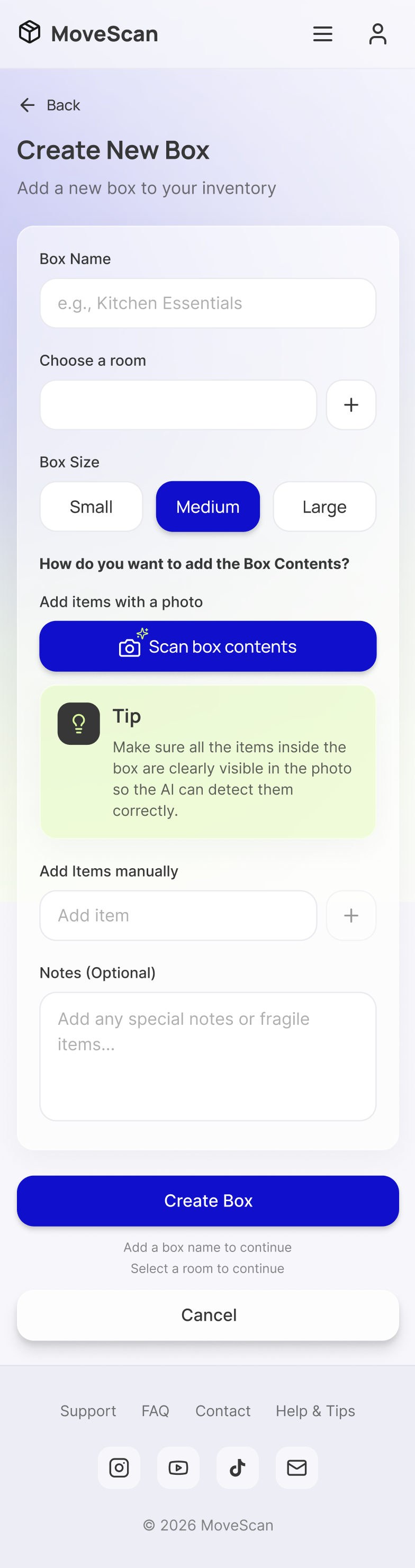
- 1The screen asks how to add the contents. Scan box contents comes first, and manual input stays below.
- 2Under Create Box, a short line says what is missing: a box name or a room.
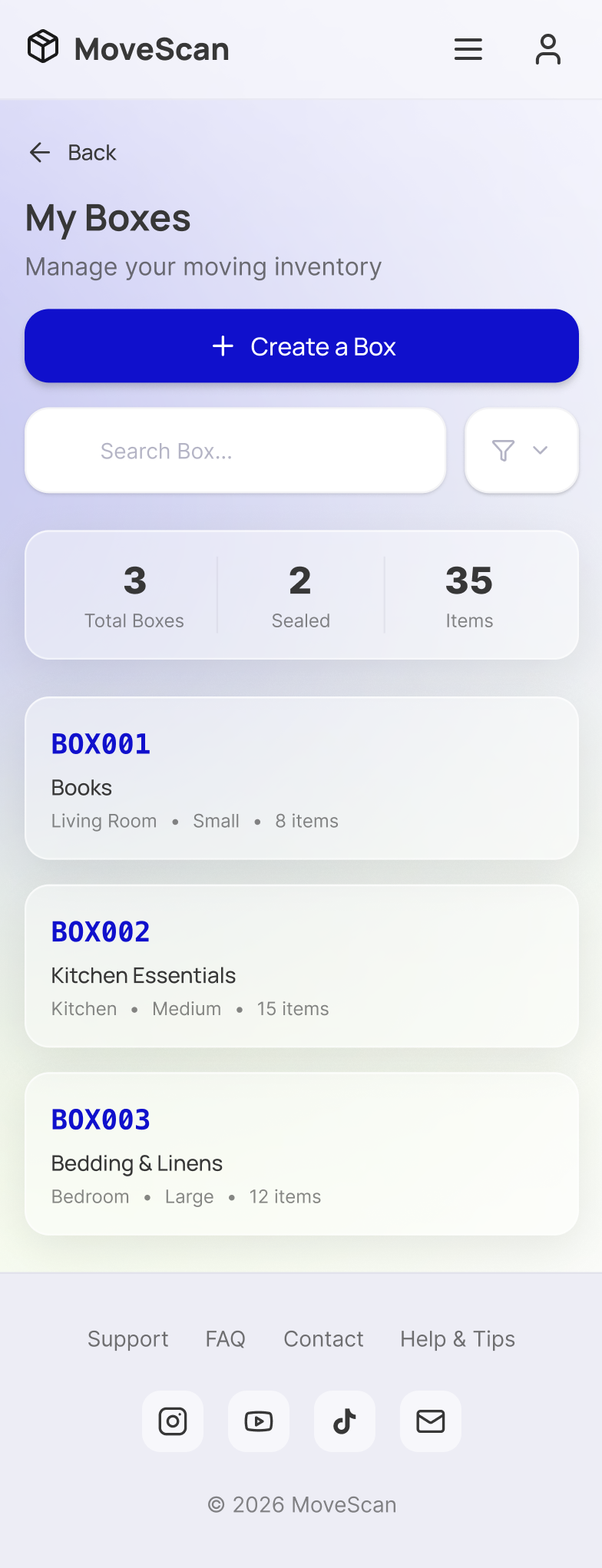
The box number does the work of the QR icon
- 1Every box card had a QR icon, and P1 and P5 did not understand what it was for.
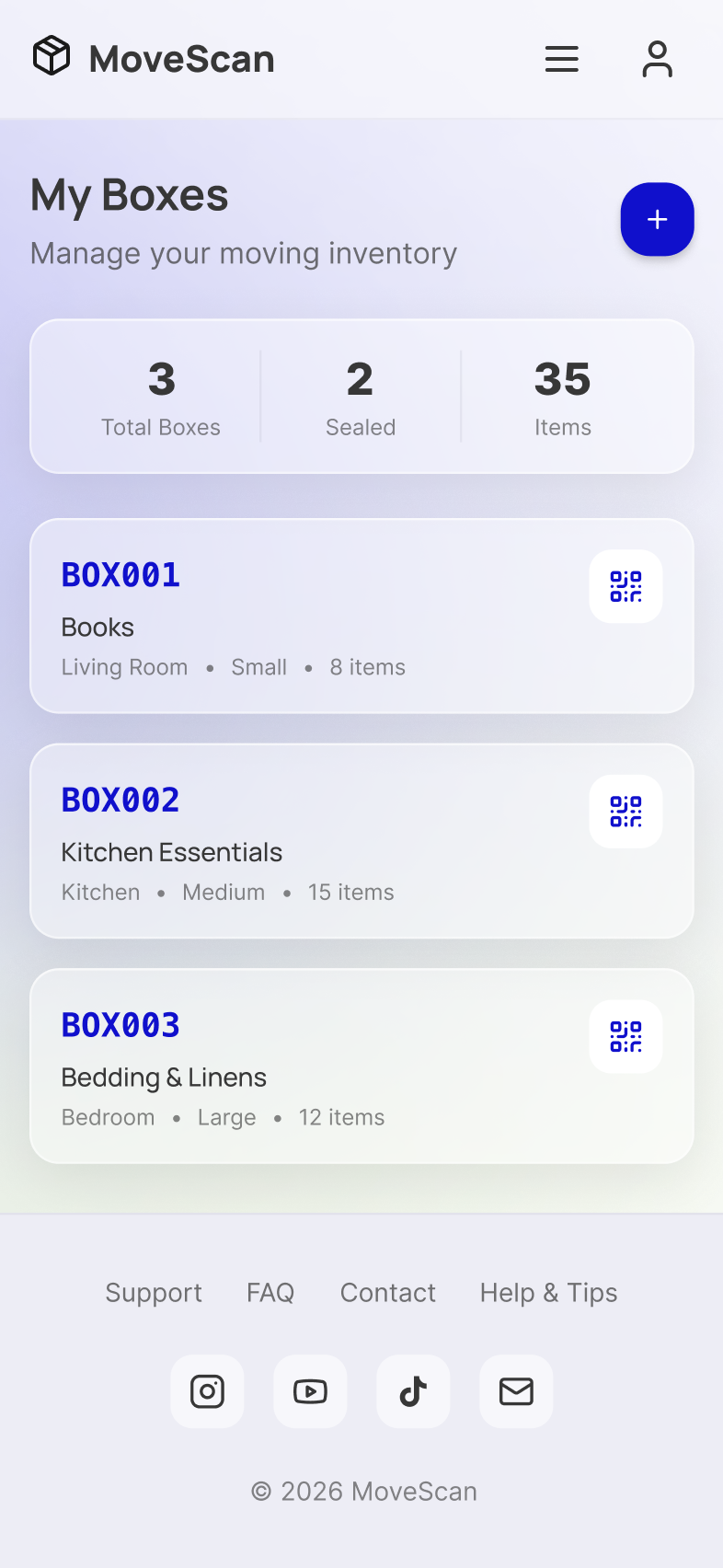
- 1The cards lead with the box number, BOX001, and the QR icon is gone.
- 2A large Create a Box button, and search with a filter above the list. P4 had asked to search boxes by name.
Each result says which box to open
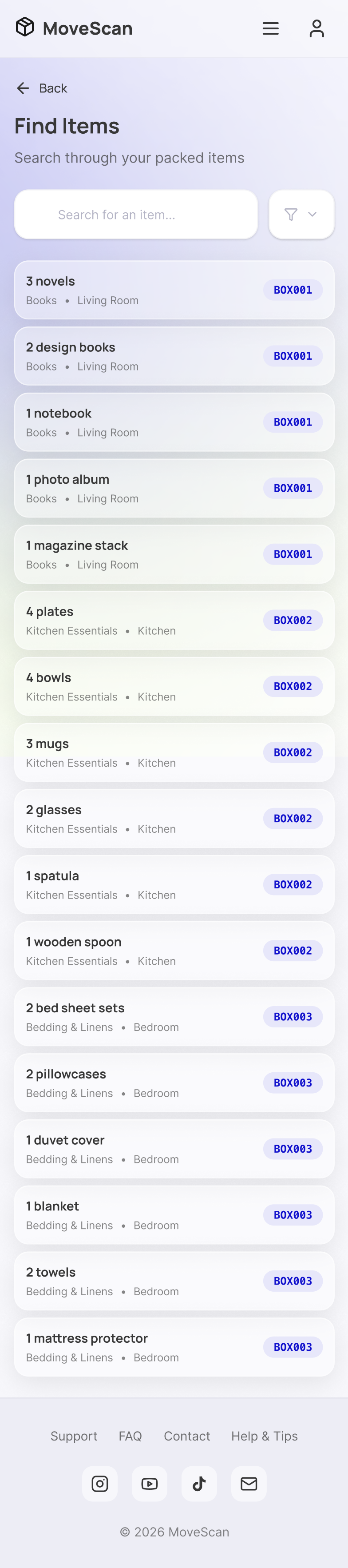
- 1Results showed the room on the right and the box number in small grey text.
- 2A Quick Stats card closed the list, and P3 did not find it useful.

- 1Each result shows its box number as a badge, so you know which box to open.
- The Quick Stats card is gone.
- Rethink the "Sealed" and "Open" labels (P2, P5)
- Group the items in Find Items by category (P4, P5)
- Help planning the move from the number and volume of boxes (P4)
The stress started earlier than I expected
I started this project thinking the main challenge was helping people pack and organise boxes. The research showed that the stress starts earlier, when people do not yet know the scale of their move. That changed the direction: I chose estimating over a planning tool, and used AI to reduce typing.
The prototype has limits. The scan is simulated, so the tests show that people understood the flow. They do not show how accurate AI estimates would be. The changes after testing were not tested again.
The next steps are to test with a working scan, rethink the "Sealed" and "Open" labels, and group the items in Find Items.
These are future metrics, not results measured during this project.
AI correction rate
How often people adjust the estimates or item labels from the scan
Inventory time
How long it takes to fill a box, compared with typing by hand
Finding time
How quickly someone finds an item and the right box
Feeling prepared
How prepared people feel before they start packing